Showing posts with label server setup. Show all posts

Thursday, June 27, 2013

New Server Form Factor: Cluster-in-a-Box

Traditional server clustering has always been one of the main 'bottlenecks' and complaints for most IT project roll-outs. The most common excuses from server admins: too complex, too expensive, taking too much power, rack space, air-con and the list goes on. To address these issues, there is a new breed of servers - not 1U or 2U rack mountable server and monstrous server blade - it's "Cluster-in-a-Box" or CiB in short. 

Simply put, all server clustering components, including computing, storage, clustering software and network, are pre-fabricated and pre-installed in a single box when deliver to your data centers. You don't have to worry about what kind of detailed specifications that you should put in your procurement tenders. Most importantly, most products claim to save power, cooling, and rack space. Take Nutanix for example. It claims to do away with expensive SAN storage and simplify cluster setup in 30 min. Furthermore, a 4-node cluster in a 2U rack mountable chassis. Compare Nutanix 1450 against traditional server clustering, the Dell equivalent would look something like:
  1. 4 x Dell R610 servers
    • 2 x Intel 6-core Xeon E5-2620
    • 64GB RAM
    • 400GB SSD
    • 2 x GE and 2 x 10GE
    • 2 x HBA controllers
  2. 2 x FC SAN switches
  3. 1 x FC SAN storage 
    • 16 x 1 TB SATA HDD
Adding up all components would take up about 8U of rack spaces with 7 different boxes or about 400% in saving in rack spaces against a single 2U Nutanix box.

Of course, traditional server vendors are not sitting back. Now, we are seeing new server product offerings like:
Look like we are entering the next wave of data center revolution.

Tuesday, May 7, 2013

Windows Server 2012 Consistent Device Naming (CDN)

The new SCVMM 2012 SP1 supports bare-metal host deployment. I was wondering if the host has multiple network connections, how would the right address be assigned from the right IP pools? Even if you've pre-patched the cables, the NIC order would change randomly once you've sysprepped or installed a new OS on the server. It had been a pain for server administrators to identify which NICs are connected to which network segments or VLANs.

While I was creating my host profile on SCVMM 2012 console, I came across this page:

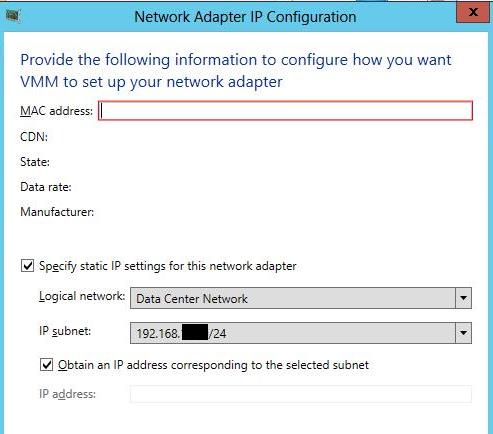
Look like if you know the CDN of each NIC, you can now pre-allocate the static IP address from the IP pool! CDN ensures that the NIC name and the printed name on the server chassis remain consistent. It's good news for every system administrator. Bad news is that CDN is only supported on WS2012 and you'll need the newest server hardware e.g. Dell's 12th generation hardware.

Without CDN, you would have to supply the individual MAC addresses of each interface and match them to the defined IP subnets as shown below.

The MAC address can be easily identified using "show mac address-table interface" command on the data center switches. Once the job started running, you should see the following screen on the bare-metal host:

Additional Resources:
  1. SCVMM 2012 - Bare-metal deployment
  2. BMC - Out-of-Band Host Management on SCVMM 2012

Tuesday, July 19, 2011

Misconfigured Interfaces on NLB cluster of Hyper-V VMs

If you ever attempt to form a Network Load Balancing (NLB) cluster with 2 or more Hyper-V VMs, you would be likely to see errors saying that the interfaces are misconfigured and both cluster and dedicated IP addressess are unable to be added to TCP/IP.

To workaround this issue, shut down the VMs. Open up Hyper-V manager and enable MAC spoofing on the interfaces that you want to load-balance as follows:

Start the VMs. Remove the old cluster and form a new one.

Friday, March 4, 2011

SID duplication doesn't matter?!

I have just come across a technet blog declaring that SID duplication doesn't matter, especially in a domain environment where Domain SID instead of machine SID is used. Domain SID is re-generated whenever a computer leave and re-join a domain, which is typical for disk imaging purposes. For years, we were taught to use sysprep or newsid to regenerate new SID for every cloned image.

"I realize that the news that it’s okay to have duplicate machine SIDs comes as a surprise to many, especially since changing SIDs on imaged systems has been a fundamental principle of image deployment since Windows NT’s inception. This blog post debunks the myth with facts by first describing the machine SID, explaining how Windows uses SIDs, and then showing that - with one exception - Windows never exposes a machine SID outside its computer, proving that it’s okay to have systems with the same machine SID."

Nevertheless, the blog concluded that sysprep is still necessary for Microsoft's support:

"Note that Sysprep resets other machine-specific state that, if duplicated, can cause problems for certain applications like Windows Server Update Services (WSUS), so Microsoft’s support policy will still require cloned systems to be made unique with Sysprep"

I would take this with a pinch of salt, as I did experience strange problems in the past for having duplicated SIDs. Or rather, I would interpret the statement this way - even though SID duplication per-se may not cause problems, unpredictable outcomes may still occur, as other machine-specific states are not reset. SID duplication is an indicator of such happening.

Thursday, March 11, 2010

How I assign storage to a VM

Someone asked how I typically assign storage to a VM. This is what I usually did - separate the data from the binaries to minimize the chance of corruption in the event of outage.

C: System OS drive. Typically assign ~60GB fixed sized VHD.

D: is application drive where I would install the application binary in VHD. Size varies on application requirements.

E: is the data or log drive where I would store the system & application data & logs. If syslog or ftp is the application, expect a big storage space. Typically, I would assign direct SAN LUN with RAID (e.g. iSCSI) to this volume. I would also redirect the host Firewall/IIS logs here for audit purposes.

In summary, C & D drives are typically assigned with VHDs that are stored on the host's direct or SAN storage while I would assign direct LUN with redundant RAID to E drive. The rationale is that the system & application binaries in C & D can be easily restored by installation but not the logs/data on E drive. Always remember to keep data and binaries separate.

Wednesday, February 24, 2010

Migrating KMS Host for Windows Activation

Two types of activation for Microsoft OS, MAK (Multiple Activation Key) and KMS (Key Management Service). The former activation is mainly used for less than 5 servers. If you use KMS, the first four hosts won't be activated until the fifth is activated. Earlier, we did a mistake of keying in the KMS host license key into some of our servers instead of the KMS client keys. As a result, multiple SRV of _VLMCS._tcp. appears on the DNS servers. Furthermore, the current KMS server is not supposed to have Internet access. Hence, we decided to migrate the KMS to another VM.

Note: If you just need to install a new KMS server, jump straight to step 5.

Steps to migrating the KMS:

1. Uninstall the KMS host key first by running the following command:

slmgr -upk

2. Then, install the default kms key by running the following command:

slmgr /ipk [KMS Client Setup Key]

The default KMS client setup keys for W2K8 R2 Enterprise is 489J6-VHDMP-X63PK-3K798-CPX3Y. As for the rest, the default KMS client keys can be found here.

3. Delete the old SRV record from the DNS:

Open DNS console:

Expand _tcp node under the domain.com. There will be a record _VLMCS. Delete this record.

4. The KMS server is uninstalled.

5. To install KMS on a new server, enter:

cscript C:\windows\system32\slmgr.vbs /ipk

then to activate the KMS host, enter:

cscript C:\windows\system32\slmgr.vbs /ato

6. After activation is complete, restart the Software Licensing Service by running "net stop sppsvc && net start sppsvc"

7. Verify that the record is created for the new server in the DNS.

To verify that the KMS host is configured correctly, you can check the KMS count to see if it is increasing. Run slmgr.vbs /dli on the KMS host to obtain the current KMS count. You can also check the Key Management Service log in the Applications and Services Logs folder for 12290 events, which records activation requests from KMS clients. Each event displays the name of the computer and the time-stamp of an individual activation request.
--------

Windows 7 and Server 2008 KMS Client Keys
Windows 7 Professional - FJ82H-XT6CR-J8D7P-XQJJ2-GPDD4
Windows 7 Professional N - MRPKT-YTG23-K7D7T-X2JMM-QY7MG
Windows 7 Enterprise - 33PXH-7Y6KF-2VJC9-XBBR8-HVTHH
Windows 7 Enterprise N - YDRBP-3D83W-TY26F-D46B2-XCKRJ
Windows 7 Enterprise E - C29WB-22CC8-VJ326-GHFJW-H9DH4

Windows Server 2008 R2 HPC Edition - FKJQ8-TMCVP-FRMR7-4WR42-3JCD7
Windows Server 2008 R2 Datacenter - 74YFP-3QFB3-KQT8W-PMXWJ-7M648
Windows Server 2008 R2 Enterprise - 489J6-VHDMP-X63PK-3K798-CPX3Y
Windows Server 2008 R2 for Itanium-Based Systems - GT63C-RJFQ3-4GMB6-BRFB9-CB83V
Windows Server 2008 R2 Standard - YC6KT-GKW9T-YTKYR-T4X34-R7VHC
Windows Web Server 2008 R2 - 6TPJF-RBVHG-WBW2R-86QPH-6RTM4

Monday, December 7, 2009

Windows System Resource Manager

Windows System Resource Manager (WSRM) can be used in 2 modes. Firstly, it allows application profiling, which helps identify the amount of resources (e.g. CPU, memory etc) that the applications consume.

Secondly, it can also operate in manage mode. WSRM uses its allocation policies to control how many resources applications can use on a server. If applications exceed the allocation, WSRM can be stop the applications from executing and make sure other applications can continue to operate. However, WSRM will not enforce the resource policies until the processor usage exceeds 70 percent.

WSRM can be assigned to manage 3 objects, namely processes, users and IIS application pools. WSRM is available for download for Windows 2003 and is available as a feature to be added in Windows 2008.