If you are unable to refresh a stuck VM on SCVMM 2012 and you see the following error:
"VMM cannot find the Virtual hard disk object' error 801"
You may need to run a SQL script to remove the orphaned objects from the database by following the steps below.
1. Stop the System Center Virtual Machine Manager service on the VMM 2012 server.
2. Back up the Virtual Manager database.
3. Open SQL Management Studio and run the following script on the VMM database:
BEGIN TRANSACTION T1
DECLARE custom_cursor CURSOR FOR
SELECT VHDId, VDriveId from
dbo.tbl_WLC_VDrive WHERE [VHDId] NOT IN
(SELECT VHDId from dbo.tbl_WLC_VHD WHERE VHDID IS NOT NULL)
DECLARE @VHDId uniqueidentifier
DECLARE @VDriveId uniqueidentifier
OPEN custom_cursor
FETCH NEXT FROM custom_cursor INTO @VHDId, @VDriveId
WHILE(@@fetch_status = 0)
BEGIN
if(@VHDId is NOT NULL)
DELETE FROM dbo.tbl_WLC_VDrive
WHERE VDriveId = @VDriveId
FETCH NEXT FROM custom_cursor INTO @VHDId, @VDriveId
END
CLOSE custom_cursor
DEALLOCATE custom_cursor
COMMIT TRANSACTION T1
4. Start the System Center Virtual Machine Manager service again and refresh problem VMs. The VMs should return to a proper reporting state.
The above resolution is extracted from this post: Performing an operation in Virtual Machine Manager fails with error 801
If you encounter Error (2606),
"Unable to perform the job because one or more of the selected objects are locked by another job."
Run this command on the affected host to resync the performance counter: winmgmt /resyncperf
Sunday, May 26, 2013

Saturday, May 25, 2013
Hyper-V (WS2012) Backup on Guest VM (WS2008)
If you're running backup jobs (e.g. DPM2012) on WS2012 Hyper-V with older guest VMs (e.g. WS2008), you might encounter this error:
The replica of Microsoft Hyper-V \Backup Using Child Partition Snapshot\[VM] on [Host] is inconsistent with the protected data source. All protection activities for data source will fail until the replica is synchronized with consistency check. You can recover data from existing recovery points, but new recovery points cannot be created until the replica is consistent.
For SharePoint farm, recovery points will continue getting created with the databases that are consistent. To backup inconsistent databases, run a consistency check on the farm. (ID 3106)
To resolve it,
1) ensure that the host contains this update KB2770917 (available in Windows update)
2) Update the Integration services on the older guest VMs e.g. WS2008R2 etc
Friday, May 24, 2013
SQLPrepInstaller of DPM2012 installation using remote SQL server
This Technet link describes the setting up of remote SQL server of Microsoft's latest backup solution - System Center Data Protection Manager (DPM) 2012 SP1.
A missing step is not mentioned for using remote SQL instance (i.e. SQL not installed on same server as DPM). You'll have to run the "SQLPrepInstaller" on the SQL server. Insert the DVD, ISO or file share image of DPM installer on the SQL server. Click on the following menu on the launcher.

A missing step is not mentioned for using remote SQL instance (i.e. SQL not installed on same server as DPM). You'll have to run the "SQLPrepInstaller" on the SQL server. Insert the DVD, ISO or file share image of DPM installer on the SQL server. Click on the following menu on the launcher.

Tuesday, May 21, 2013
Managing Office 2010 Client Key
If you run into any difficulties in activating or uninstalling Office 2010 Key, run this command at "C:\Program Files\Microsoft Office\Office14"
cscript OSPP.VBS
A list of options would be displayed.
If you're planning the sysprep this image, rearm the Office 2010 first:
C:\Program Files\Common Files\Microsoft Shared\OfficeSoftwareProtectionPlatform>ospprearm.exe
After that, check its Client Machine ID is now cleared:
C:\Program Files\Microsoft Office\Office14>cscript ospp.vbs /dcmid
If mails are stuck in draft or Outbox, try restarting the Exchange Mail Submission service on the client access server.
cscript OSPP.VBS
A list of options would be displayed.
If you're planning the sysprep this image, rearm the Office 2010 first:
C:\Program Files\Common Files\Microsoft Shared\OfficeSoftwareProtectionPlatform>ospprearm.exe
After that, check its Client Machine ID is now cleared:
C:\Program Files\Microsoft Office\Office14>cscript ospp.vbs /dcmid
If mails are stuck in draft or Outbox, try restarting the Exchange Mail Submission service on the client access server.
Thursday, May 16, 2013
Failover Cluster Manager Console keeps crashing on WS2012
If your new Failover Cluster Manager console keep crashing on WS2012 and the error message is something like:
"A weak event was created and it lives on the wrong object, there is a high chance this will fail, please review and make changes on your code to prevent the issue.",
apply this hotfix (KB 2803748) on all your cluster nodes and/or the RSAT machines immediately.
"A weak event was created and it lives on the wrong object, there is a high chance this will fail, please review and make changes on your code to prevent the issue.",
apply this hotfix (KB 2803748) on all your cluster nodes and/or the RSAT machines immediately.
Wednesday, May 8, 2013
How to add custom attributes to AD User Objects
We have an application that requires to store some custom user attributes on the Active Directory. Let's say we need to add a custom attribute "Gender". How should we go about it? We need to first extend the existing User Class in the AD Schema. Please refer to this detailed step-by-step guide.
Here, I would just summarize the overall steps.
Step 1: Register AD schema tool by running "regsvr32 schmmgmt.dll" on the Domain Controller with "Schema Master" role. Add the AD Schema tool on the mmc console.
Step 2: In the AD Schema Console, right-click the Attributes folder, then select Create Attribute.
 Step 3: You may like to generate your own private enterprise OID (Unique X.500 Object ID) for this custom attribute on this link.
Step 4: From the Schema Console, click the Class folder. Scroll down to the User class, right-click it, and select Properties. On the user Properties dialog box, click the Attributes tab. Click Add, then choose the Gender attribute. Click OK twice, and you've successfully added the Gender attribute to the User class.
Now we have an extra gender attribute for every user object. How should we populate its values (i.e. Male or Female)? If you have an excel sheet, convert it to CSV and use Powershell script to populate it. Below is sample script.
$Users = import-csv users.csv
Foreach ($user in $Users)
{
$sAMAccountName = $user.sAMAccountName
$gender = $user.gender
$Property = @{gender=$gender}
Write-host "Setting the gender of $sAMAccountName"
Get-ADObject -Filter 'sAMAccountName -eq $sAMAccountName' | Set-ADObject -add $Property
Write-host "Done!"
}
Here, I would just summarize the overall steps.
Step 1: Register AD schema tool by running "regsvr32 schmmgmt.dll" on the Domain Controller with "Schema Master" role. Add the AD Schema tool on the mmc console.
Step 2: In the AD Schema Console, right-click the Attributes folder, then select Create Attribute.

Step 4: From the Schema Console, click the Class folder. Scroll down to the User class, right-click it, and select Properties. On the user Properties dialog box, click the Attributes tab. Click Add, then choose the Gender attribute. Click OK twice, and you've successfully added the Gender attribute to the User class.
Now we have an extra gender attribute for every user object. How should we populate its values (i.e. Male or Female)? If you have an excel sheet, convert it to CSV and use Powershell script to populate it. Below is sample script.
$Users = import-csv users.csv
Foreach ($user in $Users)
{
$sAMAccountName = $user.sAMAccountName
$gender = $user.gender
$Property = @{gender=$gender}
Write-host "Setting the gender of $sAMAccountName"
Get-ADObject -Filter 'sAMAccountName -eq $sAMAccountName' | Set-ADObject -add $Property
Write-host "Done!"
}
Tuesday, May 7, 2013
Windows Server 2012 Consistent Device Naming (CDN)
The new SCVMM 2012 SP1 supports bare-metal host deployment. I was wondering if the host has multiple network connections, how would the right address be assigned from the right IP pools? Even if you've pre-patched the cables, the NIC order would change randomly once you've sysprepped or installed a new OS on the server. It had been a pain for server administrators to identify which NICs are connected to which network segments or VLANs.
While I was creating my host profile on SCVMM 2012 console, I came across this page:

Look like if you know the CDN of each NIC, you can now pre-allocate the static IP address from the IP pool! CDN ensures that the NIC name and the printed name on the server chassis remain consistent. It's good news for every system administrator. Bad news is that CDN is only supported on WS2012 and you'll need the newest server hardware e.g. Dell's 12th generation hardware.
Without CDN, you would have to supply the individual MAC addresses of each interface and match them to the defined IP subnets as shown below.

The MAC address can be easily identified using "show mac address-table interface" command on the data center switches. Once the job started running, you should see the following screen on the bare-metal host:

Additional Resources:
While I was creating my host profile on SCVMM 2012 console, I came across this page:

Look like if you know the CDN of each NIC, you can now pre-allocate the static IP address from the IP pool! CDN ensures that the NIC name and the printed name on the server chassis remain consistent. It's good news for every system administrator. Bad news is that CDN is only supported on WS2012 and you'll need the newest server hardware e.g. Dell's 12th generation hardware.
Without CDN, you would have to supply the individual MAC addresses of each interface and match them to the defined IP subnets as shown below.
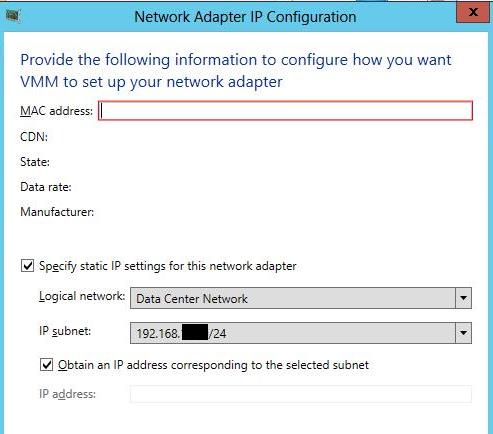
The MAC address can be easily identified using "show mac address-table interface" command on the data center switches. Once the job started running, you should see the following screen on the bare-metal host:

Additional Resources:
Subscribe to:
Posts (Atom)