According to this Hays group report, salaries for mid to senior level IT roles have increased between 15 to 20%, while lower level IT roles have seen a salary increase of around 10% in Singapore.
The report has specifically highlighted that there is an ongoing strong hiring for IT infrastructure professionals and managers. Since I'm on this profession, naturally I feel good about it.
Thursday, March 29, 2012

Friday, March 23, 2012
Sabbatical leave reflection - Family, Relationship and Career
No technical posts this month, as I'm on sabbatical leave for the entire month of March. It's a moment of personal and career reflection. My company offers sabbatical leave as part of talent retention programme for every 10-year of service. But it does come with a "price" i.e. I'm obligated to stay on with my current company for at least another year. For me, the "price" is the career opportunity cost when Singapore and regional economies in Asia are still booming.
Before I decided to take the leave, I was still mulling over whether its benefits worth the opportunity costs . It's one of my greatest dilemmas in life of pursuing between a new jet-setting regional career with a big name MNC or to stay at least another year (or probably longer) in government sector with more family time. Frankly speaking, for the past couple of years, maybe because of my passions and expertise in IT infrastructure and security, I've no lack of recruiters and head-hunters on LinkedIn (whom I've never met) "enticing" me with attractive high six-figure annual remuneration packages.
As my month-long leave is finishing in a week, let me try to reflect whether this is a "right" choice. My 6 year-old child was at risk of being diagnosed as dyslexic. Even at age of 3-4, we could hardly understand what he was trying to say and express. And he had great difficulties remembering new simple words that we taught him repeatedly. (Unlike my younger 3 year-old, he could already speak in complete logical sentences.) Since then, he had been on KKH's early childhood intervention programme. However, the therapy sessions were patchy at best and the progress was so slow that both my wife and I were concerned that he could never catch up with his peers. We were even at thought of delaying him to primary school enrolment a year later.
During these couple of months, I've worked closely with an newly assigned English literacy therapist who hailed from England - Teacher Ann. She was my son's favourite teacher who helped him to improve his English literacy by leaps and bounds. She was encouraging and engaging. Both my son and I enjoyed her many lessons tremendously that involved interesting actions of jolly phonics like ee-or (both hands on heads), sh (finger across lips) and interactive readings. How I wished I was taught this way when I was young! Hence, I've to re-learn English from her, so that I know how to train my son. If I didn't do my part well, I would get an "earful" from her in next following Monday. I supervised my child every evening for at least 30 min in writing, reading and phonic. The efforts paid off. Before intervention, his literacy score was only 26/100. In his recent latest assessment, his score was 81/100, which compared well to the median score of 50/100 among his peers in England (that's what according to teacher Ann). We were so happy and excited that we asked his another local teacher Jacqueline (from NuturyIn) to put him on her K2 class (he was placed on K1 class originally, as he was behind his peers). But the class was full. Because she shared our joys, she decided to open up a new K2 class just for us. We were so thankful and relieved. But it's not going to end our "intervention". We know we're in a long haul process to keep him going until he can fully read and learn independently.
Meanwhile, I took a step back and reflected on goals and objectives in life. I've started relating to my loved ones and people around me. I've also settled on our Wills and Testaments in case both my wife and I "leave" this planet pre-maturely. We also went to Chiang Mai, Thailand and had good spa/massage and hair treatments.
Coming April, I'll be moving on to a new technical consultancy role within the same organisation. I still can't decide whether this is a right choice ultimately. But at least, I've no "regrets" for my personal "achievements" within the month, as it's not "wasted" and something that I probably couldn't and won't do normally.
Thursday, February 16, 2012
BGP does not advertise iBGP-learned routes to eBGP peers?
Theoretically, BGP does not advertise iBGP-learned routes to eBGP peers. Hence, I did not filter iBGP learned routes to my eBGP peers. I didn't realise my eBGP router did advertise these iBGP routes (not meant for transit) until our partner informed me and I did a "show ip bgp vpnv4 VRF-name neighbors 1.1.1.1 advertised-routes" to verify. So, is this theory wrong?
Well, it comes with a caveat. This theory is true only if BGP synchronisation is enabled. The rule of synchronization states that routes learned via BGP must be validated by the interior routing table before they can be advertised to remote peers. So, what does this mean? Click here for explanation.
In older Cisco IOS versions, Synchronization is enabled by default. However, it is disabled by default in Cisco IOS Software Release 12.2(8)T and later. If you do not intend for the iBGP learnt routes to be on transit among different AS, it is probably safer to enable BGP synchronization.
Sunday, January 29, 2012
How to Filter Unwanted Data without adding to Splunk Daily Indexing Volume
Splunk is a great tool for consolidating, processing and analysing voluminous data of all sorts, including syslog, Windows events/WMI etc. It's pretty much like a Google search engine equivalent for your IT environment where you may have daily GBs or even TBs of raw logs and events to content with. Furthermore, you're likely to find free Splunk apps to support and analyse the events of your favourite IT appliances and applications - sort of iOS and Android to entertain and educate your kids (or your bosses in this case).
It's great in almost every aspect, except one - daily indexing volume that is limited by your Splunk licensing. And it doesn't come cheap - typically a high 5 digit figure for a meagre single digit GB daily indexing volume. If you have limited budget and "unlimited" amount of data, you'll have to start "rationing" and decide which types of data are of interest and value.
Of course, you can let Splunk do the auto-filtering but unwanted data are still counted to the daily volume, as it is performed after indexing. To "save" the daily volume limit, you have to filter out unwanted data before it reaches your Splunk indexer. Generally, there are 2 approaches i) filter it at the source devices (e.g. more specific and stringent ACL logging on Cisco IOS devices etc); ii) filtering using regular expression (REGEX) at the Splunk heavy forwarder (i.e. before Splunk indexer) installed on the data source. Unwanted data would be sent to the nullQueue for discard and wanted data would be sent to the index queue. I would be elaborating this method here. You may also want to check out this Splunk article as well.
How Splunk Moves Data through the Data Pipelines
First, we need to understand how data are being consumed, processed and moved about in Splunk. You can also read this full Splunk article, where I would just briefly summarise it here in sequential order:
- Input : Data is fed into Splunk. No data processing here.
- Parsing : Analyse and transform data according to regex transform rules
- Indexing : Splunk takes the parsed events and writes them to the search index on disk.
- Search : Search through the indexed events. This is what you would see eventually.
Distributed Deployment
The next thing we need to understand is distributed deployment. We have to segregate parsing transformation from indexer, in order to ensure that unwanted filtered data would not count toward the indexing volume. For scalability reasons, 3 different Splunk roles can be setup in 2 or more machines:
- Forwarder : Input segment occurs here. For heavy forwarder, parsing and partial indexing can also be performed before sending it to the Indexer.
- Indexer : Indexing activities are processed here. Indexed data are written to disk.
- Search Head : The search GUI for users. It would search through various indexers to present the search results.

Step-by-Step Distributed Setup for Pre-Indexing Filter
One prerequisite is distributed setup whereby the Splunk Forwarder is separated from the Splunk Indexer. You may want to setup two separate Virtual Machines for testing purposes. One is designated as a dedicated input Heavy Forwarder and another is designated as Receiver cum Indexer cum Search Head.
Step 1: Setup Receiver and Heavy Forwarder
On the receiving indexer, under Splunk path "etc/system/local", add the following lines to inputs.conf
# you may substitute "9997" with other TCP ports [splunktcp://forwarder_IP:9997]
# ensure that the listener is enabled.
disabled = 0
When you run "netstat -ano" on Windows system, you should be able to see TCP 9997 as a listening port.
On the Heavy Forwarder, add the following lines to the inputs.conf
# Specify a data source. Monitor files on "C:\TestLog" folder, which is empty at this moment.
[monitor://C:\TestLog]
# specify a source type for later identification
sourcetype = cisco_syslog
disabled = 0
Step 2: Ensure communication between Heavy Forwarder and Receiver is working
You should not just rely on network ping! Check the Splunkd log under Splunk Path "var/log/splunk". You should see this line:
01-28-2012 21:48:18.502 +0800 INFO TcpOutputProc - Connected to idx=10.1.1.96:9997
Otherwise, you would see Warning or Error, rectify them accordingly. If you see these messages:
01-28-2012 21:42:49.338 +0800 WARN TcpOutputFd - Connect to 10.1.1.96:9997 failed. No connection could be made because the target machine actively refused it.
01-28-2012 21:42:49.338 +0800 ERROR TcpOutputFd - Connection to host=10.1.1.96:9997 failed
Ensure that correct IP address in bold on the listening host [splunktcp://forwarder_IP:9997]. Otherwise, use [splunktcp://:9997] instead to allow inputs from any Splunk forwarders.
Step 3: Configure Data Input on Heavy Forwarder
You'll have to specify the data source on the heavy forwarder. For testing purposes, I have created a sample syslog file with just 4 lines of sample data. I copied the file to the "C:\TestLog" folder that I created earlier.
Step 4: Test Distributed Processing is working
On the forwarder's Splunk Web, go to Manager -> Data Inputs -> Files and Directories. Check that the "Number of Files" processed on "C:\TestLog" is incremented by one.
On the indexer/receiver's Splunk Search app, check that all 4 lines are being indexed in distribution mode. No filtering is being done yet.

Step 5: Setup Data Filtering during Parsing Phase
You would only need to work on the heavy forwarder in this step. Out of the four syslog lines, only one line contains a keyword "error" that would be used as the REGEX key word here. To force Splunk forwarder to send data to the parsing queue (for REGEX filtering) instead of going directly into the Indexing queue, you have to add this bold line to the earlier inputs.conf:
[monitor://C:\TestLog]sourcetype = cisco_syslog
queue = parsingQueue
disabled = 0
The bold line would cause Splunk to lookup to the props.conf under Splunk folder "etc/system/local". Create this new file and add the following lines:
# you may replace this spec for something else. In this example, I'm using a sourcetype "cisco_syslog" # to match the "C:\TestLog" in the earlier inputs.conf
[cisco_syslog]
TRANSFORMS-set= setnull,setparsing
Create another file transforms.conf under the same folder and add the following lines:
[setnull]
#match anything with a single dot "."
REGEX = .DEST_KEY = queue
FORMAT = nullQueue
[setparsing]
REGEX = error
DEST_KEY = queue
FORMAT = indexQueue
In this example, all lines (except containing keyword "error") would be discarded on Null Queue. The order is important. Make sure the [setnull] is always on top, otherwise all data would be discarded on Null Queue. If you want to logic to be reversed (discard all lines containing "error"), you would just need to add the following lines instead:
[setnull]
REGEX = errorDEST_KEY = queue
FORMAT = nullQueue
Restart Splunk for the new configurations to take effect. One quick way is to use CLI "splunk restart" on the Splunk "bin" folder or click the "Restart Button" using Splunk Web manager.
Step 6: Test Pre-Indexing Filter
I copied another file (with a new file name) with the same 4 lines content. The file is consumed and sent over to the receiver. On the receiver's Search App, examine the contents of the indexed data using the source command or just simply click on the link on the search summary. As you can see from below, only the line containing keyword "error" is being indexed. The other 3 lines are discarded on the null queue during the parsing segment at the heavy forwarder.

Monday, January 16, 2012
Install Office 2007 on Terminal Server/Session Host
If you want to install Office 2007 on a Terminal Server, you have to perform the installation in the following sequence:
- Open an elevated command prompt
- Put the TS on install mode by running change user /install
- Run the program installer Setup.exe as usual
- Choose custom install, ensure none of the components are on "Install on First Use" option. Select either "Run from My Computer" or "Not Available".
- Upon successful installation, run change user /execute
Saturday, January 7, 2012
VLAN settings on SCVMM 2012 RC
If you use VLAN in your network, you can simply add a VLAN id directly into the "Virtual Network" adapter using SCVMM 2008. The new 2012 RC introduces "Logical Networks" concept where you have to pre-define the VLAN id and network subnets before they can be rolled out. On the SCVMM 2012 RC management console, click on Fabric and Logical Networks as shown below:


When you return to the "Network Adapter" settings of your VMs, you can now assign the VLAN id accordingly.
Friday, January 6, 2012
First VM attempt on SCVMM 2012 RC
Happy new year to all! This is my first posting for the year. Microsoft has released SCVMM 2012 Release Candidate (RC) version and I rushed to the trial without much reading. To my surprise, the concept is now radically different from its previous 2008 R2 version. First of all, SCVMM 2012 now has a concept called "Cloud". Microsoft has been marketing SCVMM as the foundational tool for private cloud deployment. As multiple Hyper-V hosts form a "Cluster", multiple clusters (including VMWare ESX, Xen, Hyper-V) and hosts now form a "Cloud". Services and VMs may now reside in any clusters and hosts within a cloud.

As I added existing Hyper-V clusters, the next error that I encountered was existing 2008 VMM agents were not compatible with SCVMM 2012. Hence, I have to removed all existing agents. If you are like me who prefer bare-metal Server Core and rushed into the new SCVMM, you might have to remove the agents manually looking at the "Uninstall String" within the Windows registry and run the uninstall command (See this explanation post).
Hyper-V hosts were finally added. Happily, I created the hardware profile and VM templates just like what I did in the previous version. In my first attempt of making a new VM out of the new templates, I encountered this error saying that I simply can't place the new VM into the Clustered Shared Volume.
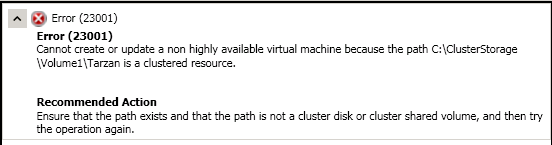
New in 2012 RC, SCVMM now ensures that only VMs marked as "Highly Available" (HA) can be placed in a CSV. 2012 RC introduces a new concept called "Capability Profiles" and the relevant resources (clouds and clusters) must be marked with the relevant "HA" capability. See this post for step-by-step guide.
Also, you have to mark the new VM as highly available in the "Advanced" section of the VM hardware profile setting as shown below:

Finally, my first VM for the year 2012 was successfully rolled into the "cloud".
Subscribe to:
Posts (Atom)